Know where every litre of DG diesel actually goes
AssetPro sensors sit on the generator's tank and engine, so DG fuel consumption, running hours, load, and refuels are measured — not reconstructed from a logbook. Catch siphoning, verify every refuel against actual tank rise, and see whether each DG is earning the diesel it burns.
Fuel issued to each DG is matched against fuel actually consumed. Gaps are flagged for review — never averaged away.
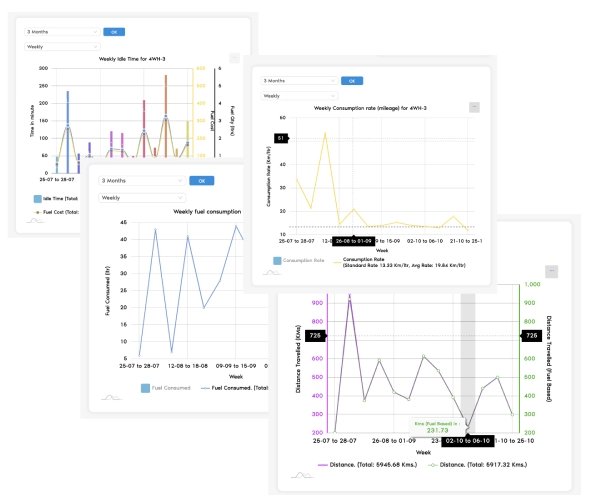
Illustrative dashboard. Figures shown are sample values, not a customer result.
Built for generator-heavy operations
Tank-level telemetry
Measured, not assumed
Detection & alerts
One DG estate view
Why DG diesel goes missing
On most sites, the only record of generator fuel is a piece of paper written by the person handling the fuel.
Fuel records are self-reported
Issue slips, dip-stick readings, and operator diaries. Nothing independently confirms how much diesel went into the tank or came out of it.
Running hours don't prove consumption
An hour meter tells you the engine ran. It doesn't tell you at what load, or how many litres that run should have cost — so any hours-based estimate is a guess.
Refuels are never verified
A tanker is billed for 500 litres. Nobody checks whether the tank level actually rose by 500 litres. Short-fills and over-billing pass straight through to the ledger.
Siphoning happens when nobody is watching
Remote towers, unmanned pump houses, night shifts, weekends. A slow drain of a few litres a night is invisible in a monthly total.
Low-load running is invisible
A large DG carrying a small load burns diesel for very little useful output — and risks wet stacking. Without load data, nobody sees it happening.
Reconciliation is monthly and manual
By the time a variance shows up in the accounts, the shift, the tanker, and the trail are weeks old. Nothing can be investigated.
Sensors on the generator, intelligence in AssetPro
A fixed installation on each DG set, streaming to one platform. No manual entry in the measurement path.
Fuel level sensor
A probe fitted in the DG day-tank or bulk tank reports continuous level, calibrated to that tank's actual geometry so readings are in litres — not a percentage guess.
Engine run & hours
Engine on/off and running hours are captured automatically. Every run becomes a timestamped session with a start level, an end level, and the litres consumed in between.
Load & output optional
Where a DG controller or energy meter is available, load %, kW/kVA and kWh delivered are read in — via Modbus, RS485, or CT sensing — turning litres into litres per unit of power.
Telemetry to AssetPro
Readings stream over GSM/4G to the AssetPro platform. If a site loses connectivity, readings are buffered and back-filled on reconnect — and periods with no data are shown as gaps, not as zero.
What you get on every DG set
Six capabilities that turn generator fuel from an unverifiable expense into a controlled, auditable operating cost.
Real-time tank level
Live fuel level in litres for every DG set and bulk tank, across every site, on one screen. Low-level and reserve-breach alerts so a critical generator never runs dry mid-outage.
Theft & siphon detection
Any fuel drop that isn't explained by engine running is flagged — with the site, the DG, the timestamp, and the litres lost. Slow overnight drains and one-off bulk siphons are both caught.
Refuel verification
Every delivery is matched to the actual rise in tank level. Short-fills, over-billing, and phantom deliveries surface the same day — with the evidence attached to the transaction.
Fuel vs. running-hour reconciliation
Litres per running hour, per DG, per shift — compared against that machine's own established baseline. A generator that starts drinking more than it used to is visible immediately.
Load-based efficiency
Where load data is available, see litres per kWh delivered — the only number that says whether the diesel bought useful power. Compare DG sets, sites, and vendors on the same measure.
Utilisation & exception reporting
Run hours, load profile, idle and low-load running, and unexplained variance — by DG, by site, by month. Exceptions land in a review queue instead of disappearing into a monthly average.
Is each DG earning its diesel?
Stopping theft only fixes half the bill. The other half is generators running when they don't need to, carrying loads far below their rating, or sitting oversized on a site that never draws what they can deliver. AssetPro puts numbers against all of it.
- check_circleLoad factor per run session — spot sustained low-load running and wet-stacking risk
- check_circleRun hours by site and shift — see generators running longer than the outage required
- check_circleRight-sizing evidence — a 250 kVA set that never crosses 60 kW is a documented case for redeployment
- check_circleStandby readiness — fuel in tank measured against the hours of backup it actually represents
- check_circleRental & contract DGs — verify billed running hours and fuel against sensor-recorded runs
Measured, not estimated
Fuel numbers end up in cost sheets, vendor disputes, and disciplinary conversations. They have to hold up. AssetPro is deliberately built so that a number on the screen is a number a sensor reported — and where data is missing, it says so.
Litres come from the sensor
Consumption is derived from measured tank levels and run sessions, not back-calculated from a rated litres-per-hour figure.
Missing data is shown as missing
A connectivity gap or a failed sensor appears as a gap. It is never silently filled with an average, a previous reading, or a zero.
Variances are flagged, not netted off
An unexplained drop at one site doesn't get cancelled out by a surplus at another. Each exception is raised on its own, for review.
Raw readings are retained
The underlying telemetry stays available alongside the computed consumption, so any disputed figure can be traced back to source.
Wherever generators carry the load
From a single standby set behind a building to hundreds of DGs spread across remote sites.
The reports your finance and site teams ask for
Scheduled to inbox or exported on demand — the same underlying data, for operations and for audit.
Daily DG report
Run hours, litres consumed, opening and closing level, and refuels — per DG, per day.
Refuel report
Every delivery with quantity billed, tank rise measured, and the variance between them.
Consumption vs. run hours
Litres per hour trended per machine, against its own baseline — early warning on engine condition.
Exception & variance report
Unexplained drops, short-fills, runs without load, and data gaps — listed for review, with status.
Site-wise comparison
Cost of backup power by site and by month — so outliers are a question, not a surprise.
Service due on run hours
Sensor-recorded running hours feed DG servicing schedules, so maintenance is driven by real usage.
A crucial addition to our hospital operations. With extensive DG set use for power backup and a fleet of ambulances, the system lets us track fuel consumption in real time, reduce waste, and ensure fuel is available precisely when needed. It's helped us optimize fuel use, reduce costs, and keep our emergency response seamless.
Before you ask
Does the DG have to be a particular make or model?
No. Fuel-level and run-detection sensing is fitted to the tank and engine, so it works on any diesel generator regardless of brand or age. Reading load and kWh directly needs a controller or energy meter that exposes the data — where that isn't available, you still get litres, run hours, and litres per hour.
What happens at sites with poor mobile network?
Readings are buffered on the device and uploaded when the network returns. Any period genuinely without data is shown as a gap in the reports rather than being filled in with an estimate.
Can it tell theft apart from normal consumption?
Fuel drops are assessed against engine state. A drop while the engine is off, or a fall much faster than that machine's established burn rate, is raised as an exception with time, site, and litres. The system flags it for a human to investigate — it does not decide intent.
We already use AssetPro for vehicles. Is this separate?
It's the same platform. DG sets sit alongside your vehicles and equipment as assets, sharing the same fuel records, maintenance history, alerts, and reporting. See Fuel Management for the wider fleet view.
How are manual refuels recorded?
Site staff can log a refuel from the AssetPro mobile app with quantity, photo, and location. That entry is then reconciled against the measured tank rise — the app records the claim, the sensor confirms it.
How long does installation take?
A single DG set is typically commissioned in a short site visit, including tank calibration. Multi-site rollouts are planned in phases so you can validate the data on a pilot group before scaling.
Put a meter on every litre of DG diesel
Tell us how many generators you run and where they sit. We'll show you exactly what the data would look like for your sites — and what it would take to get there.
Also see: Fuel Management for vehicles and equipment · Energy & Battery Monitoring for the wider power estate.